OSPF: Quick Configuration and Troubleshooting Guide
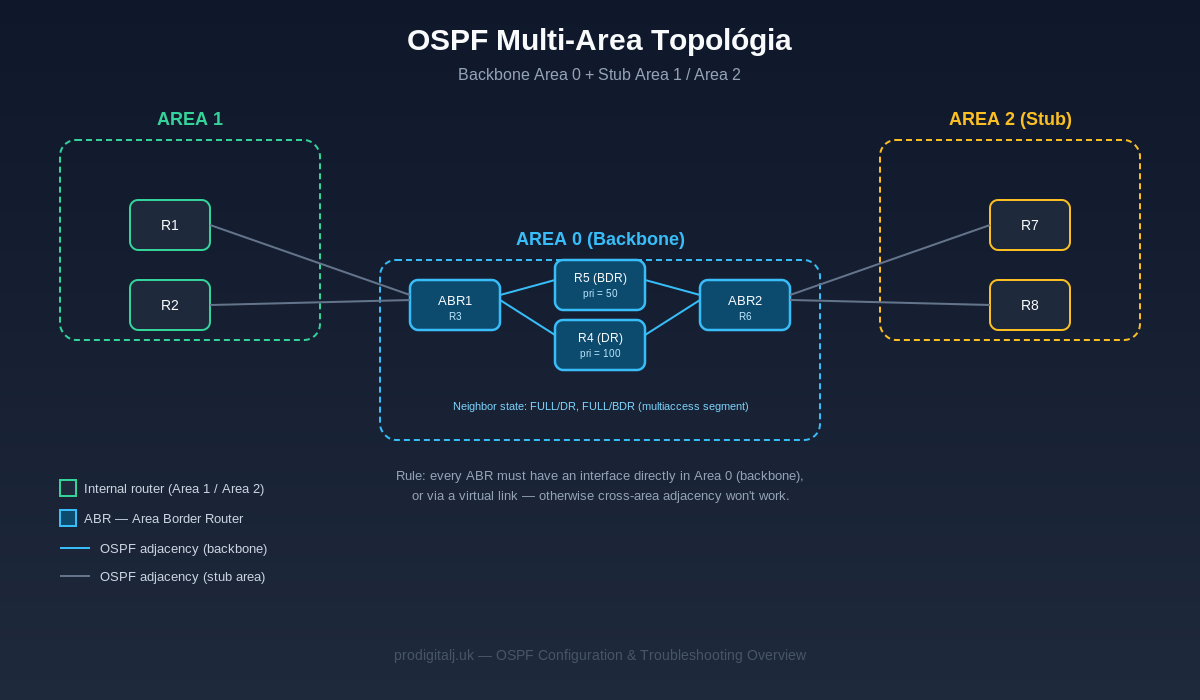
OSPF (Open Shortest Path First) is a link-state routing protocol used as the de facto standard in enterprise and service provider networks. This article covers the essential Cisco IOS configuration and the most common troubleshooting steps.
1. Basic Configuration
Minimal configuration on a single router:
router ospf 1
 router-id 1.1.1.1
 network 10.0.0.0 0.0.0.255 area 0
 network 10.0.1.0 0.0.0.255 area 1
Recommended best practices:
- Always set the router-id manually — otherwise OSPF picks it from the highest loopback/active IP address, which causes unexpected re-elections after a reload or topology change.
- On WAN and point-to-point interfaces, set the network type explicitly with ip ospf network point-to-point if the physical layer doesn't match a broadcast segment — otherwise OSPF unnecessarily attempts a DR/BDR election.
- On multiaccess segments (LAN, VLAN), control DR/BDR election with ip ospf priority instead of leaving it to router boot order.
- Enable authentication (MD5 or SHA on newer versions) on all OSPF-enabled interfaces, at minimum between ABR routers.
2. Multi-Area Configuration
As shown in the diagram above, every non-backbone area (Area 1, Area 2) must connect directly to Area 0 through an ABR (Area Border Router). If a direct physical connection to the backbone is missing, configure a virtual link:
router ospf 1
 area 1 virtual-link 3.3.3.3
For stub / totally stubby areas, where external routes don't need to be propagated:
router ospf 1
 area 1 stub
 area 1 stub no-summary   ! totally stubby on the ABR
3. Troubleshooting — Step by Step
**1. Verify neighbor adjacency:**
show ip ospf neighbor
The state should be FULL (or FULL/DR, FULL/BDR on a multiaccess segment). If it stays stuck at 2-WAY, EXSTART, or INIT, the usual cause is an MTU mismatch, missing authentication, or a network type mismatch.
**2. Check which interfaces are enrolled in OSPF:**
show ip ospf interface brief
Confirm the interface is in the correct area, with the expected network type and cost.
**3. Verify the LSA database:**
show ip ospf database
Useful when you suspect an inconsistent topology database between routers in the same area — all of them should hold an identical LSDB.
**4. Debug during an active issue (use with caution, ideally off-peak in production):**
debug ip ospf adj
debug ip ospf events
**5. Verify the routing table:**
show ip route ospf
Most Common Root Causes
| Symptom with most likely cause |
Adjacency stuck at EXSTART/EXCHANGE : MTU mismatch between interfaces
Adjacency stuck at 2-WAY : Mismatched network type (broadcast vs. point-to-point) or DR/BDR conflict
Adjacency never forms: Mismatched Area ID, Hello/Dead timers, authentication, or an ACL blocking multicast 224.0.0.5/6
Routes missing from the routing table: Area not connected to Area 0 (missing ABR or virtual link)
Frequent flapping: Unstable interface, incorrect router-id, or missing authentication (spoofed Hello packets)
4. Summary
OSPF is a robust protocol as long as you maintain a consistent area structure, a manually set router-id, matching network types on both ends of a link, and authentication. Most production issues can be diagnosed with the sequence show ip ospf neighbor → show ip ospf interface brief → show ip ospf database, without needing deeper debugging.